Using AI to Manage Hybrid Teams Efficiently: Scaling Leadership with Automation
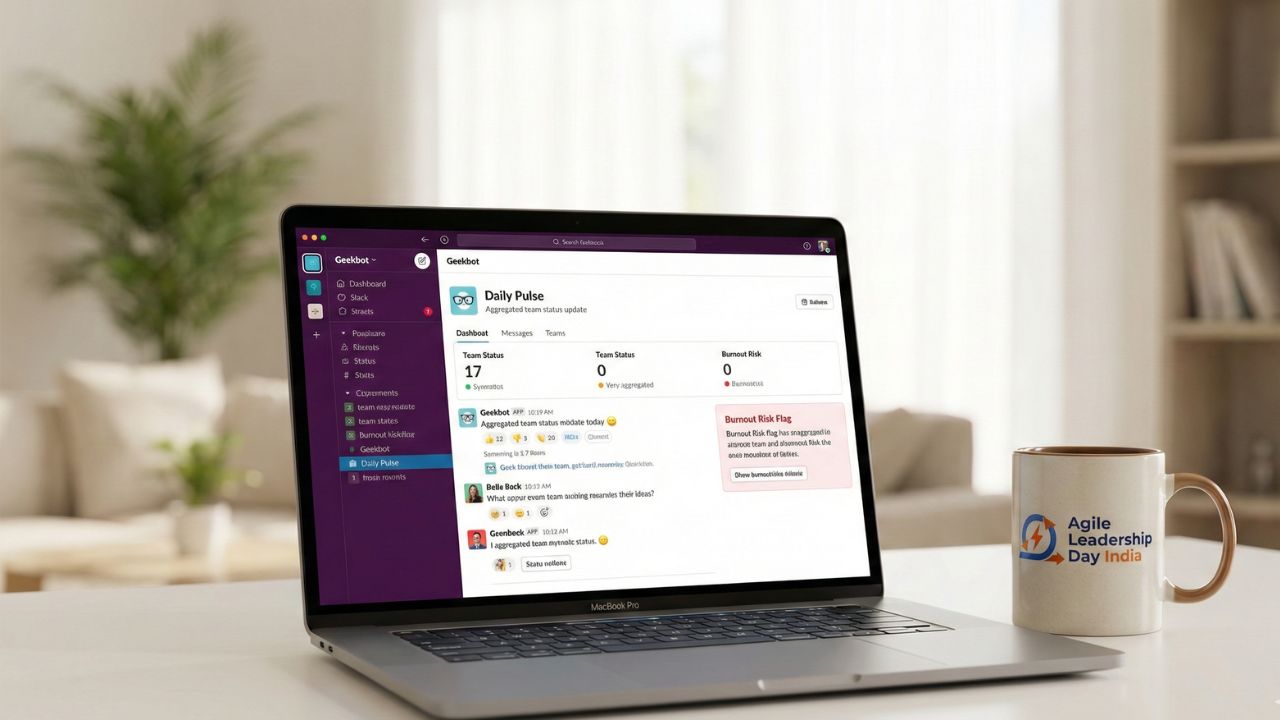
- The "AI Chief of Staff": Stop chasing updates. Use AI agents to automate status collection and sprint progress tracking.
- Sentiment over Surveillance: Use AI to detect burnout signals in communication patterns (tone/volume) rather than keystroke logging.
- The End of "Recap" Meetings: AI meeting assistants provided automated summaries, freeing up hours previously lost to administrative note-taking.
- Bridging Time Zones: AI translation and async summarization allow global teams to stay aligned without 3 AM calls.
- Ethical Guardrails: Transparency is non-negotiable. Your team must know what AI is tracking and why.
The New Layer of Hybrid Management
Managing a distributed team often feels like being a "router"—constantly passing messages between people who never meet. The administrative overhead of hybrid work (scheduling, documenting, following up) can easily consume 50% of a manager's week.
This is where using AI to manage hybrid teams efficiently shifts from a luxury to a necessity. It isn't about replacing the manager; it's about automating the "router" work so you can focus on the people.
Note: This deep dive is part of our extensive guide on Ultimate Tech Stack for Hybrid Sprint Planning.
Strategy 1: Automating the "Status Chase"
The biggest time-waster in hybrid work is the daily stand-up meeting that could have been an email. AI agents can now integrate into Slack or Teams to prompt employees for updates and compile them into a digestible report.
How to execute:
- Deploy an AI bot to ask three questions at the start of the day.
- The AI aggregates answers into a "Daily Pulse" dashboard.
- You only step in when the AI flags a blocker.
This frees up massive amounts of time for deep work. If you are struggling to protect your team's focus, review our strategy on How to Implement Deep Work in Hybrid Teams.
Strategy 2: AI as a Burnout Detector
Burnout in remote teams is silent. You often don't see it until the resignation letter arrives. New AI tools analyze metadata—not content—to spot risks. They look at:
- After-hours activity: Is the team posting on Slack at 9 PM?
- Sentiment drops: Is the tone of messages becoming increasingly negative or curt?
- Isolation: Is a specific employee being left out of communication loops?
Critical Note: This data must be used for support, not punishment. If you use it to micromanage, you will destroy trust. For more on maintaining trust, read How to Build Psychological Safety in Hybrid Teams.
Strategy 3: The Automated Meeting Record
Taking notes during a Zoom call prevents you from actively listening. The Fix: Use AI meeting assistants (like Otter or Fireflies) to record, transcribe, and summarize every call.
Action Items: The AI automatically extracts tasks and assigns them to owners. Searchability: You can search "Project X Budget" and find the exact timestamp where it was discussed. Async Catch-up: Team members who missed the call can read the 5-minute AI summary instead of watching the hour-long recording.
FAQ: Troubleshooting AI in Management
AI allows you to skip meetings. By generating accurate summaries and action items, team members can opt out of live attendance and catch up asynchronously in minutes.
Look for tools that focus on output rather than activity. Tools like Linear (for engineering) or ClickUp's AI features track task completion rates and velocity, rather than hours online.
Yes. AI sentiment analysis tools can flag anomalies, such as a sudden increase in working hours or a sharp drop in communication frequency, which are leading indicators of burnout.
Integrate your video conferencing tool (Zoom/Teams) with an AI transcriber. Configure it to email a bulleted summary to all attendees and "optional" invitees immediately after the call ends.
AI predicts timeline slippage. By analyzing historical task completion data, it can warn you: "Based on past velocity, Project X is likely to be late by 4 days," allowing you to intervene early.
Use tools like Standuply or Geekbot. These agents ping team members at their local start time, collect text updates, and post a threaded summary to a public channel.
It can if used secretly. To avoid this, be transparent. Explain that AI is checking for workload balance (preventing burnout), not individual keystrokes.
Real-time AI translation tools in Slack or Zoom allow team members to type/speak in their native language while colleagues receive the message in theirs, reducing miscommunication.
The biggest risk is algorithmic bias—promoting or penalizing people based on data that doesn't capture the full context of their work (e.g., "soft skills" or mentoring).
Start with "prompt engineering" workshops for management tasks. Teach them how to use AI to draft empathetic feedback, write clear project briefs, and analyze data without bias.
Conclusion
We are entering the era of "Human-Agent Collaboration." The managers who succeed in 2026 will be those who delegate the administrative burden to software.
By using AI to manage hybrid teams efficiently, you reclaim the time needed to do what AI cannot: mentor, inspire, and build culture. Do not let the tools manage you. Use them to clear the path for your team.
Next Step: Now that you have optimized your management stack, focus on the people. Read our guide on Managing Gen Z in a Remote Work Environment to retain your future leaders.
Sources and References
- Authority Gap: Strategy for AI overhead management
- Page Title: Using AI to Manage Hybrid Teams Efficiently
- Pillar Link: Ultimate Tech Stack for Hybrid Sprint Planning
- Neighbor Link: How to Build Psychological Safety in Hybrid Teams
- Neighbor Link: How to Implement Deep Work in Hybrid Teams
- Neighbor Link: Managing Gen Z in a Remote Work Environment