How to Set Up "Runaway Agent" Alerts in AWS & Azure
The nightmare scenario of 2026 is not a hacker stealing your data; it is a "Runaway Agent" trying to be helpful. An agent gets stuck on a coding task, encounters an error, and decides to "retry" 5,000 times per minute. By the time you wake up, you’ve burned your entire Q3 budget.
This alerting guide is the safety manual for our CFO’s Guide to Agentic AI Costs. We will look at how to build the "Circuit Breakers" that traditional cloud monitoring tools miss.
1. The "Latency Gap" in Cloud Budgets
Most teams rely on AWS Budgets or Azure Cost Management. The problem? Latency. Cloud billing data is often delayed by 8-24 hours. If an agent goes rogue at 2:00 AM, a budget alert at 2:00 PM is too late.
2. Strategy A: AWS CloudWatch Anomaly Detection
For AWS Bedrock users, you must move upstream from "Cost" to "Usage."
The Metric: Monitor `ModelInvocationCount` and `InputTokenCount`. These metrics are real-time.
The Implementation:
- Go to CloudWatch Metrics and select your Bedrock Model ID.
- Enable "Anomaly Detection" (the wave icon).
- Set the band to 3 Standard Deviations.
- Trigger an SNS Topic if the usage breaches this band for more than 5 minutes.
This alerts you to a change in behavior (the spike) long before the bill arrives.
3. Strategy B: The Azure "Action Group" Kill-Switch
Azure allows for powerful automation when a budget forecast is exceeded.
The Setup:
- Create a "Cost Budget" scoped to your AI Resource Group.
- Set the Alert Condition to: "Forecasted spend > 110% of Monthly Budget."
- The Critical Step: Assign an "Action Group" that triggers an Azure Logic App.
- Program the Logic App to temporarily Disable the API Key or Stop the VM hosting the agent.
4. The "Application Layer" Circuit Breaker
Infrastructure alerts are the last line of defense. The first line should be in your code.
If you are using LangChain or AutoGPT, you must implement a `Max_Loops` counter. Never allow an agent to run a `while True` loop without a hard limit.
# Python Example: The Hard Limit
MAX_ITERATIONS = 25
loop_count = 0

while task_not_complete:
    agent.think()
    loop_count += 1

    if loop_count > MAX_ITERATIONS:
        raise RunawayAgentException("Agent exceeded safe thinking limit.")
        break
5. Next Steps: Unified Visibility
Alerts are great, but a dashboard is better. Once you have your safety nets in place, you need a single pane of glass to see which teams are consistently triggering these alerts.
Read the Review: Best AI FinOps Tools We compare CloudZero vs. Vantage to see which platform handles anomaly detection best out-of-the-box.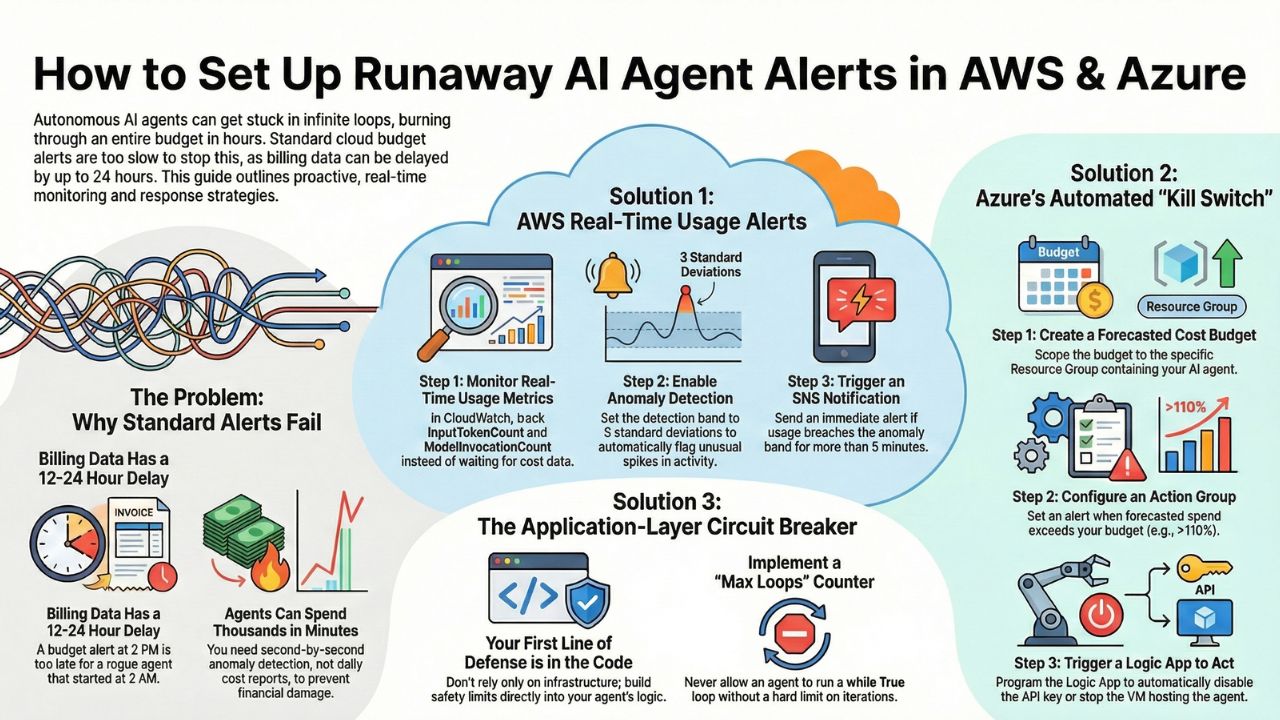
6. Frequently Asked Questions (FAQ)
A: Standard cloud budget alerts often have a latency of 12-24 hours. A "runaway" agent running on high-speed GPUs can consume thousands of dollars in minutes. You need real-time anomaly detection, not delayed budget reports.
A: A Kill Switch is an automated mechanism (usually a Lambda function or Azure Logic App) that immediately revokes the IAM keys or API access of a specific agent identity when a financial or behavioral threshold is breached.
A: Infinite loops manifest as a spike in "Input Token" volume without a corresponding "Outcome" or "Success" signal. Monitoring the ratio of Tokens-to-Outcomes is the most reliable way to spot a stuck agent.