How to Tag AI Resources: A Step-by-Step Guide to Allocating Agent Costs
If you can't tag it, you can't bill it. In the old world of Cloud FinOps, you tagged a server once, and it stayed tagged for years. In the new "Agentic Era," resources are created and destroyed in seconds.
This technical guide is a critical implementation layer of our wider CFO’s Guide to Agentic AI Costs. Here, we move away from high-level strategy and into the JSON and YAML required to stop "Unallocated Spend" from ruining your budget.
1. The "Ephemeral" Problem
An autonomous agent might spin up a temporary vector store (to analyze a PDF), execute a Lambda function (to format the data), and then delete both resources 30 seconds later. If you rely on "Weekly Cost Reports" to catch untagged resources, you have already lost. That cost is now "Unallocated," and your CFO hates you.
The Golden Rule of AI Tagging: Automate tagging at the moment of creation.
2. Strategy A: Enforcing "Tag-on-Create" (AWS)
In AWS, you must move from "monitoring" tags to "enforcing" them. Use Service Control Policies (SCPs) or IAM Policies to deny the creation of resources that lack specific tags.
The IAM Policy Snippet
This policy prevents an Agent (or developer) from launching an EC2 instance unless it includes the `Agent-ID` tag.
{
    "Version": "2012-10-17",
    "Statement": [
        {
            "Sid": "DenyRunInstanceWithoutTags",
            "Effect": "Deny",
            "Action": "ec2:RunInstances",
            "Resource": "arn:aws:ec2:*:*:instance/*",
            "Condition": {
                "StringNotLike": {
                    "aws:RequestTag/Agent-ID": "*"
                }
            }
        }
    ]
}
3. Strategy B: Azure Policy for Inheritance
Azure handles this elegantly through "Policy Inheritance." You can enforce that any resource created within a specific Resource Group automatically inherits the tags of that group.
Implementation: Create a dedicated Resource Group for each Agent Fleet (e.g., `rg-agent-customer-support`). Apply the tag `CostCenter: 101` to the group. Use Azure Policy definition `Inherit a tag from the resource group` to ensure every ephemeral disk or IP created by the agent gets that tag automatically.
Next Step: Visualization Once your tags are flowing, you need a tool to visualize them. Check our review of CloudZero vs. Vantage to see which handles tag-based reporting better.4. The "Trace ID" Approach for LLM Calls
Infrastructure is only half the battle. What about the API calls to OpenAI or Bedrock? These don't show up as "servers."
You must implement Header Propagation. When your agent makes a call to a model, it should inject a custom header or metadata field.
- OpenAI: Use the `user` parameter to pass a composite string: `agent_id:123|task_id:456`.
- AWS Bedrock: Use `CheckTag` or integrate with AWS X-Ray to trace the request ID back to the originating Lambda function.
5. Handling Shared Resources (Vector DBs)
A single Pinecone index might serve 50 different agents. How do you split the cost?
The "Tenant" Tag: When inserting vectors, add a metadata field for `tenant_id`. While this doesn't reduce your cloud bill directly, it allows you to perform "Showback" reporting later by querying the vector usage stats.
Critical Safety Step: Alerting Tagging tells you WHO spent the money. Alerting stops them from spending too much. Read our guide on setting up "Runaway Agent" alerts.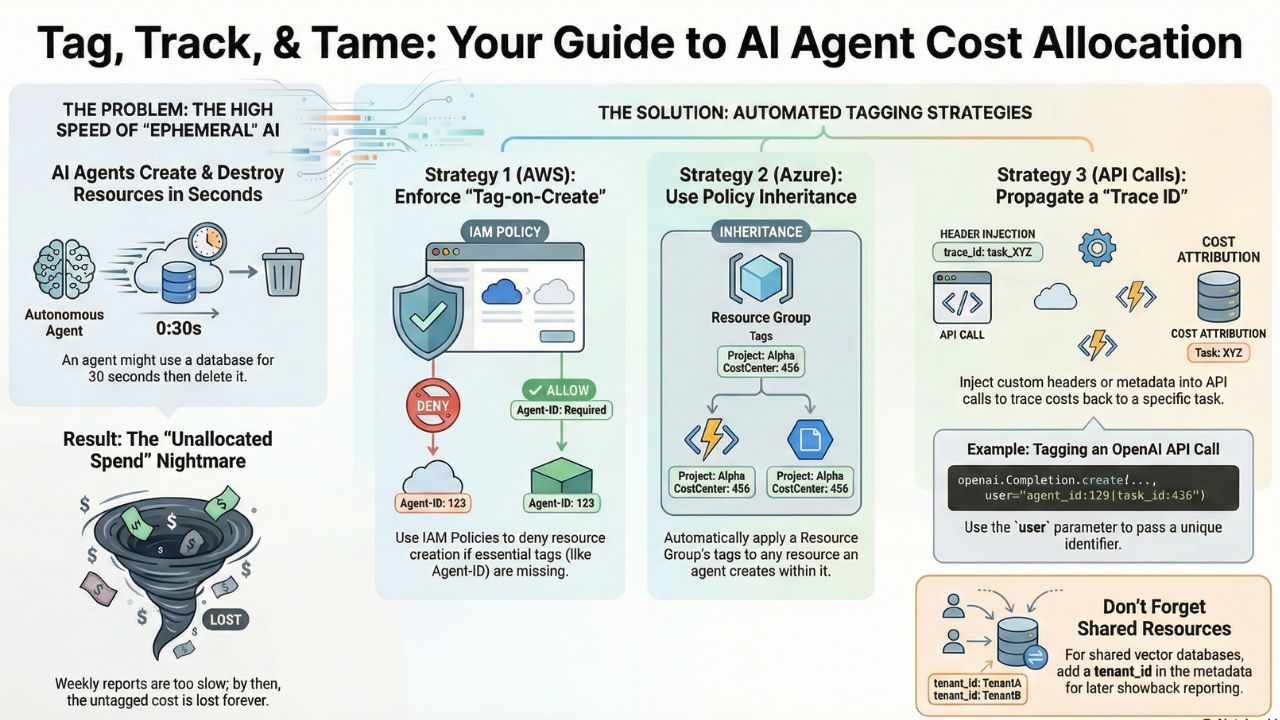
6. Frequently Asked Questions (FAQ)
A: AI Agents create ephemeral resources (like temporary vector stores or Lambda functions) that may exist for only seconds or minutes. Human engineers cannot tag these resources fast enough manually; the tagging must be automated at the moment of creation.
A: The "Agent-ID" or "Outcome-ID" is critical. It links the infrastructure spend (compute/storage) to the specific business task the agent was performing, allowing you to calculate Unit Economics.
A: You cannot "tag" the API call directly in the cloud console like a server, but you can use the "user" parameter in the OpenAI API request to pass a unique identifier (like a Customer ID or Agent ID), which helps in cost attribution downstream.