Claude Desktop vs Cursor: Why One MCP Client Leaks Data
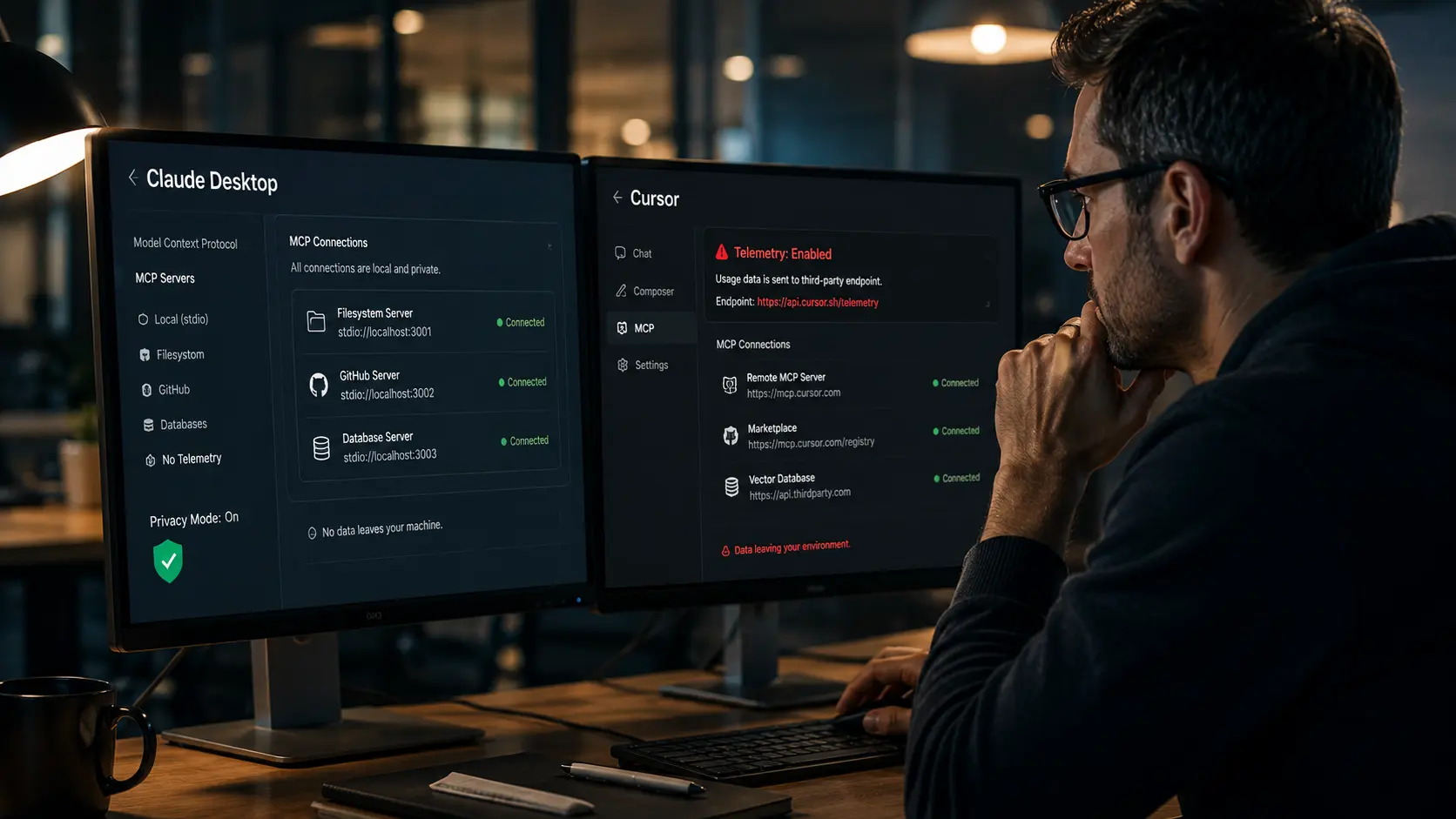
- The Telemetry Trap: Cursor's default configuration routes significant code context and prompt metadata through third-party telemetry endpoints, violating strict data residency requirements.
- Claude Desktop's Edge: Anthropic’s Claude Desktop isolates its MCP execution environment, offering a tighter, more audit-ready walled garden for regulated industries.
- MDM Enforceability: You must enforce your MCP client allowlist via Mobile Device Management (MDM) to block unauthorized, rogue IDE extensions.
- Open Source Alternatives: Tools like Cline and Continue.dev offer deep multi-server orchestration but require heavy configuration to meet enterprise compliance standards.
- Audit Blindspots: Client-side orchestration masks backend data flows, requiring strict gateway policies to monitor server connections.
One of the most popular MCP clients in your engineering team's stack is currently shipping proprietary context to a third-party endpoint by default—and your security operations center is completely blind to it.
As enterprises rush to adopt agentic workflows, the focus has heavily skewed toward securing the server side. However, if you have read our baseline Model Context Protocol enterprise guide, you understand that the client application is the actual perimeter.
Your developers are downloading fast, highly capable AI IDEs and desktop clients to interact with your internal MCP servers. Without a strict enterprise MCP client policy, these applications act as unmonitored data exfiltration vectors.
This deep-dive technical comparison reveals the architectural divide between the leading MCP clients and provides the exact matrix CTOs are using to mandate secure deployments in 2026.
The Hidden Telemetry Trap in MCP Clients
When an engineer connects a client to an internal Jira or GitHub MCP server, the resulting data flow is assumed to be local. This is a dangerous misconception.
Many developer-centric MCP clients are built to aggressively log telemetry. They want to understand how users leverage prompt chains and orchestrate tools.
If a client sends an error log or a performance metric back to its creator, it often inadvertently attaches the context window. If that context window contains proprietary API keys or PII fetched via an MCP server, you have suffered a silent data breach.
Claude Desktop vs Cursor: The Architectural Divide
Evaluating Claude Desktop vs Cursor MCP client comparison requires looking past the UI and examining the underlying data routing architecture.
Claude Desktop: The Enterprise Walled Garden
Anthropic designed the Claude Desktop application with enterprise compliance in mind. Its MCP implementation operates within a strict, local sandboxed environment.
When Claude Desktop executes a local MCP tool, the transport layer (stdio or HTTP) is strictly brokered by the host machine. Data residency remains under your control until the specific prompt payload is sent to Anthropic's secure API.
For organizations bound by HIPAA or SOC 2, Claude Desktop provides the cleanest audit trail and the lowest risk of accidental third-party telemetry leaks.
Cursor: The Productivity Engine with a Catch
Cursor is undeniably the fastest AI-assisted IDE on the market. However, its aggressive optimization relies heavily on cloud-side processing and telemetry.
By default, Cursor routes significant portions of your codebase context and MCP execution metadata through its own backend to enable features like "Copilot++" and fast indexing.
Does Cursor send MCP context to a third-party endpoint by default? Yes. Unless explicitly toggled into "Privacy Mode," your internal MCP server data is transiting through Cursor's infrastructure.
If you are actively mitigating threats outlined in the AgentOps machine identity security guide, allowing an un-audited third-party client to intercept machine-to-machine traffic is an unacceptable risk.
Evaluating Cline and Continue.dev
Beyond the heavyweights, the open-source ecosystem offers powerful alternatives like the Cline MCP client and Continue.dev MCP.
Continue.dev is highly attractive for privacy-conscious enterprises. Because it is fully open-source, your security team can audit the telemetry pipeline and permanently disable external data sharing at the source code level before distributing it to developers.
Cline offers superior multi-server orchestration, allowing complex agentic chains. However, this power makes it harder to audit. You must heavily monitor its execution paths to ensure it doesn't fall victim to advanced injection vectors, similar to the ones detailed in our MCP confused deputy attack mitigation breakdown.
Securing Your Fleet: MDM and Audit Controls
You cannot rely on the honor system for your enterprise MCP client policy. Engineering teams will always download the tool that removes the most friction.
To secure your perimeter, you must utilize your MDM (Mobile Device Management) solution—like Jamf or Intune. Deploy an explicit allowlist. Block the execution of unapproved MCP clients at the OS level.
Furthermore, your backend MCP gateway must be configured to inspect the User-Agent and client headers. If a connection attempt originates from an unapproved client, the gateway must drop the connection and flag the SIEM instantly.
Conclusion: Enforce the Standard
Treating MCP clients as harmless local applications is a critical architectural error. The client is the gateway to your proprietary data, and clients that leak context via hidden telemetry will cause you to fail your next security audit.
Your Action Plan: Finalize your enterprise MCP client policy today. Standardize on a single, audit-ready client like Claude Desktop, deploy your MDM blocking rules for all unapproved IDEs, and secure your perimeter before scaling your agentic workflows.

Frequently Asked Questions (FAQ)
Claude Desktop is a standalone application offering a secure, sandboxed environment optimized for enterprise compliance and strict data residency. Cursor is an AI-first IDE that deeply integrates MCP for developer productivity but utilizes cloud-side processing and telemetry that can inadvertently leak internal server context.
Claude Desktop and Continue.dev are the most commonly approved clients for regulated environments. Claude offers enterprise-grade API agreements, while Continue.dev allows security teams to fully audit the open-source codebase and hardcode telemetry off-switches before internal deployment.
Yes. In its default configuration, Cursor sends codebase context, prompt metadata, and resulting MCP execution data to its cloud endpoints to power its advanced auto-complete features. Enterprises must strictly enforce "Privacy Mode" to prevent this data exfiltration.
In Cursor, you must navigate to settings and explicitly enable "Privacy Mode." In open-source clients like Continue.dev, you can disable telemetry in the config.json file. For absolute security, block the known telemetry domains at your corporate firewall.
Currently, Claude Desktop (when paired with an Anthropic Enterprise tier) offers the most robust administrative controls, allowing organizations to manage deployments, enforce SSO, and dictate which remote MCP servers are accessible across the corporate fleet.
Yes. You must use MDM platforms like Jamf or Microsoft Intune to enforce an application allowlist. This prevents developers from downloading and running experimental or unvetted MCP clients that bypass your established enterprise telemetry and security policies.
Cline and Continue.dev are highly customizable IDE extensions offering deeper developer workflows and complex multi-server orchestration compared to Claude Desktop's chat interface. However, they require significantly more configuration and continuous security auditing to meet enterprise compliance baselines.
Cline currently leads in multi-server orchestration. It excels at autonomously chaining commands across multiple distinct MCP servers (e.g., pulling a Jira ticket, searching GitHub, and running a local terminal command) within a single continuous agentic loop.
Client-side auditing is notoriously difficult. To gain visibility, you must route all MCP traffic through a centralized enterprise gateway. The gateway logs the client's identity, the target server, and the exact JSON-RPC payload, creating a SOC 2-compliant audit trail.
Claude Desktop ensures data remains local until sent to Anthropic's compliant API. Cursor's default posture processes data in its own cloud, violating strict residency. Continue.dev can be configured for 100% local residency by pointing it exclusively at local or self-hosted LLMs.