Monitoring AI Bot Efficiency: The Jira Admin's Guide to Usage Insights
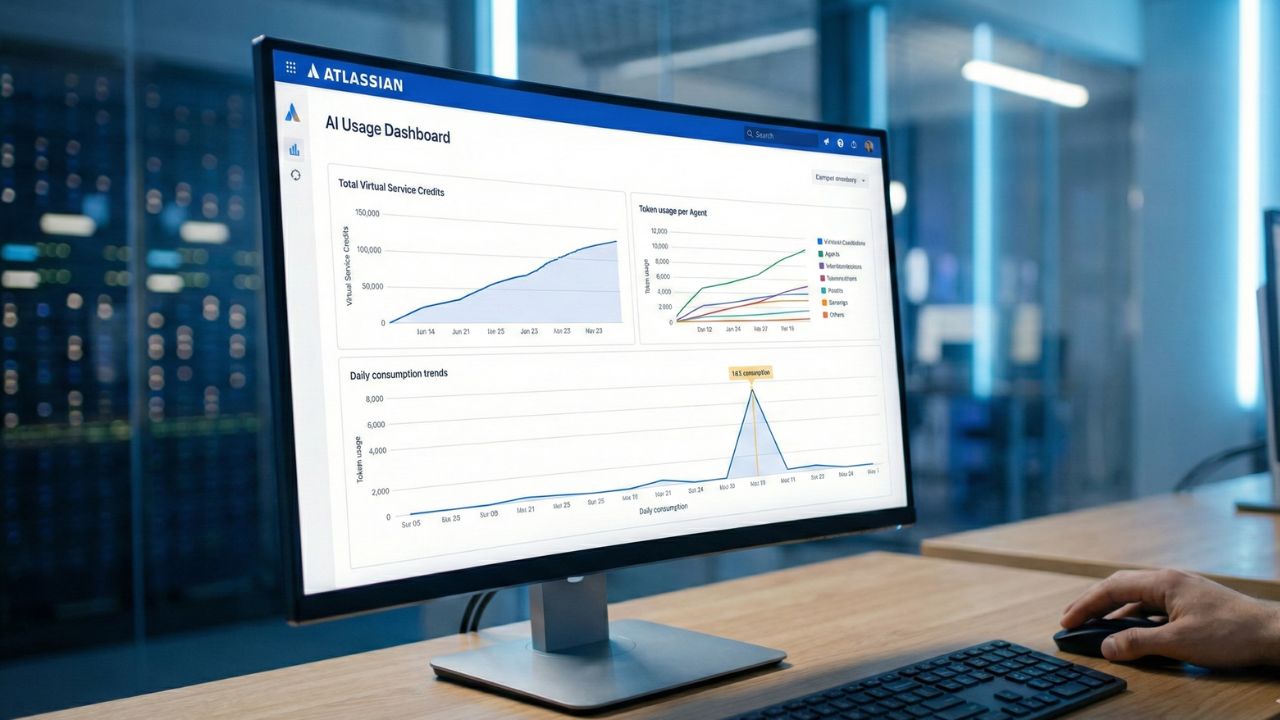
- The Command Dashboard: Access the highly detailed "AI Usage" tab within Atlassian Administration > Insights to witness real-time credit consumption across your entire instance.
- Identifying Runaway Agents: Learn to proactively identify and halt agents trapped in recursive logic loops that aggressively drain your enterprise credit balance.
- Automated Cost Control: Set highly specific organizational usage limits and triggered notifications to prevent catastrophic, unexpected bill shocks at month-end.
- Strategic Optimization: Utilize consumption data to confidently downgrade inefficient agents from expensive premium models to cost-effective alternatives.
You have successfully deployed your suite of autonomous Rovo agents, and your team's velocity is soaring. However, you are now facing a fundamentally new enterprise challenge: Governance. Monitoring AI Bot Efficiency is no longer an optional "nice-to-have"—it is the primary, indispensable duty of the modern 2026 Jira Administrator.
This technical deep dive serves as a critical governance chapter within our broader framework on Atlassian Intelligence and Agentic Workflows. Without proper, proactive oversight, a single misconfigured automation script can violently churn through your entire corporate credit allowance in a matter of days. Here is your definitive guide to mastering the Atlassian Usage Insights dashboard and systematically stopping "runaway" agents before they break your IT budget.
The Dashboard: Atlassian Administration > Insights
The beating heart of your entire AI governance strategy lies securely within the AI Usage Dashboard. To access this command center, navigate directly to your global Atlassian Administration panel, select the Insights module, and click on AI Usage.
Here, you aren't just looking at basic "uptime" metrics or ping rates. You are actively analyzing financial consumption. The dashboard provides a deeply granular breakdown of total Virtual Service Credits consumed, exact token usage mapped per active Agent, and sweeping daily consumption trendlines.
If you don't yet grasp exactly how these proprietary credits translate to actual operational dollars, pause reading here and immediately review our detailed Atlassian Rovo Pricing & Credit Calculator guide.
Spotting the Dangerous "Runaway" Agent
What exactly is a "runaway" agent? It is a poorly prompted or conflicting AI agent caught in a relentless, recursive loop—constantly triggering an action, failing validation, and aggressively retrying—all while rapidly draining your computational resources.
Key symptoms of a Runaway Agent include:
- Sudden Activity Spikes: An immediate, unexplainable vertical line appearing in your daily credit consumption graph.
- Repetitive Error Logs: The agent generates thousands of identical "Action Attempted" or "Rate Limit Exceeded" logs in mere minutes.
- Zero Tangible Output: The agent is demonstrably consuming massive credits but failing to resolve tickets or update fields.
Vigilant administrators must set up automated alerts to catch these system anomalies immediately. Robust governance ensures that an experimental bot built by an enthusiastic junior developer doesn't accidentally cost the company thousands of dollars overnight.
Setting Usage Limits and Escalation Notifications
To definitively prevent "bill shock," you absolutely cannot rely on manual, end-of-week dashboard checks. You must proactively configure system-wide hard limits and tiered soft notifications.
The Recommended 2026 Enterprise Configuration:
- Soft Warning Alert (50%): Automatically notify the engineering lead or bot owner when an individual agent hits half of its allocated monthly allowance.
- Critical Escalation Alert (90%): Notify Jira Administrators and IT Procurement immediately via high-priority Slack/Teams channels.
- Hard Circuit Breaker (100%): Automatically pause and disable the offending agent's execution capabilities to completely prevent overage charges.
Optimizing for Financial Efficiency
Effective monitoring isn't merely about playing defense; it is about proactive optimization. The Insights dashboard actively helps you identify agents suffering from "Overkill Models." If you notice a specific agent consuming massive credits for incredibly simple tasks (like formatting "Daily Standup Summaries" or labeling bugs), it is highly likely running inefficiently on a premium model like Claude Opus.
You can leverage this concrete usage data to force a system switch to Claude Haiku, instantly reducing operational costs by up to 60% without sacrificing any tangible performance. This rigorous optimization ensures that your broader AI Agents for Jira Workflows remain highly cost-effective as your agile organization scales.
Build custom enterprise tools and automation interfaces in seconds by chatting with AI using Lovable.

We may earn a commission if you purchase through this link.
(This does not increase the price for you)
Frequently Asked Questions (FAQ)
You can quickly identify a runaway agent by looking for sudden, unexplained vertical spikes in the AI Usage Dashboard. These specific agents typically display incredibly high token consumption paired with remarkably low successful task completion rates.
The dashboard is securely located in the global Atlassian Administration console. Navigate to the Insights tab, and select the specific section labeled AI Usage to view enterprise-wide consumption metrics.
Yes. Atlassian allows administrators to set stringent hard limits and configure soft warning notifications. This governance ensures you are alerted well before a poorly configured agent inadvertently consumes your entire monthly credit budget.
The Final Verdict on Governance
Effective Monitoring of AI Bot Efficiency is the absolute dividing line between a highly profitable enterprise AI implementation and a massive financial liability. By mastering the Atlassian Usage Insights dashboard, you can swiftly spot runaway agents, enforce strict budget limits, and ensure your agile automation scales sustainably. Do not just build agents—govern them ruthlessly.