Jira Intelligence vs. Linear vs. ClickUp Brain: Best AI Project Management Tools (2026)
Does your project management tool write your User Stories for you? If not, you are falling behind[cite: 67].
In 2026, the Project Management tool is no longer just a database of tickets; it is an active participant in your Sprint Planning. We tested the AI features of the top 3 platforms—Jira, Linear, and ClickUp—to answer the critical question: Which tool actually reduces admin overhead?
Whether you need enterprise-grade compliance or startup-speed triage, this guide breaks down the "AI Tax" and the productivity gains of each platform.
1. The Feature Showdown Matrix
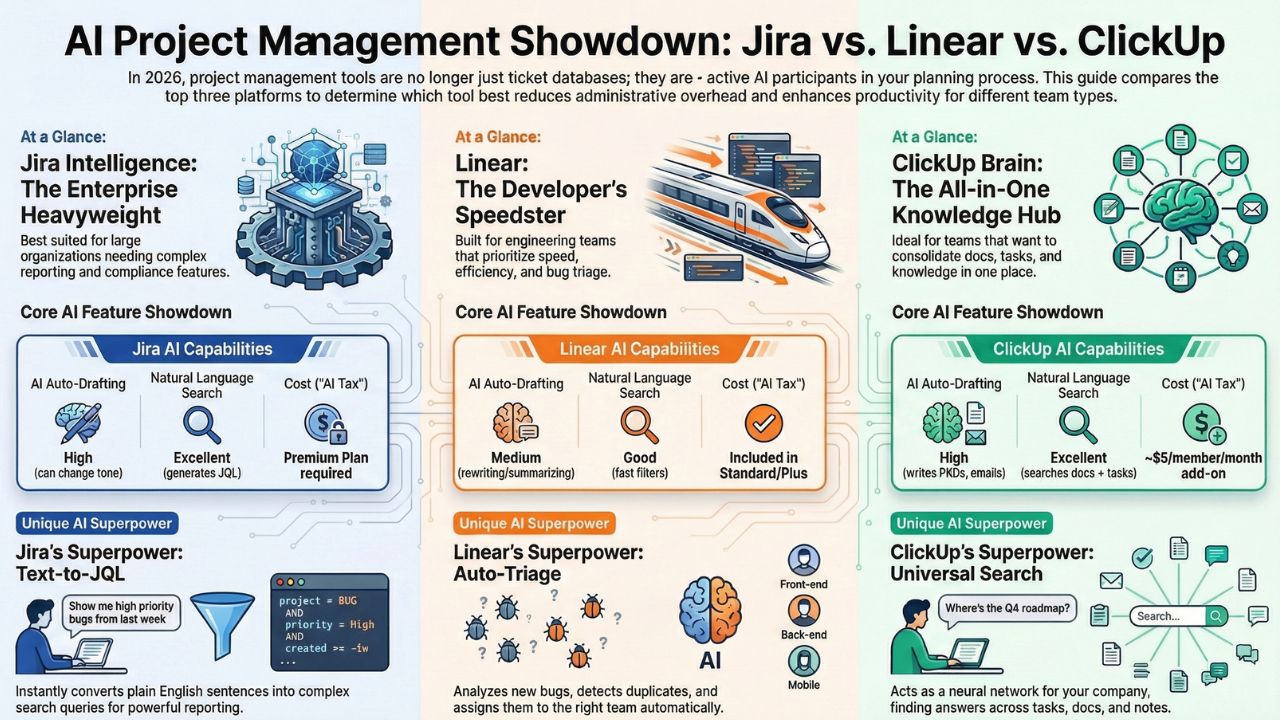
| Feature | Jira Intelligence | Linear | ClickUp Brain |
|---|---|---|---|
| Best For... | Enterprise & Complex Reporting | Speed & Engineering Teams | Knowledge Management & Docs |
| AI Auto-Drafting | High. Can change tone (Professional/Empathetic). | Medium. Focuses on rewriting/summarizing. | High. Writes PRDs, Emails, and Standups. |
| Natural Language Search | Excellent (Generates JQL from text). | Good (Fast filters). | Excellent (Searches Docs + Tasks). |
| Cost (The "AI Tax") | Premium Plan required. | Included in Standard/Plus. | ~$5/member/month add-on. |
2. Jira Intelligence: The Enterprise Heavyweight
Jira remains the standard for large organizations, and its AI features reflect that[cite: 12]. The standout feature here is not just text generation, but Text-to-JQL.
Previously, finding "All bugs in Sprint 4 assigned to Junior Devs that are blocking release" required complex query knowledge. Now, you simply type that sentence, and Jira Intelligence writes the query for you.
Pros & Cons
- Pro: Deep integration with Confluence for summarising requirements.
- Pro: "Virtual Agent" for Service Management helps deflect support tickets.
- Con: Only available on Premium/Enterprise tiers, making it expensive for small teams.
3. Linear: The Developer's Speedster
Linear has always obsessed over speed, and their AI implementation is no different[cite: 13]. While Jira tries to do everything, Linear focuses on "Auto-Triage."
When a new bug is reported, Linear's AI analyzes it, checks for duplicates, assigns it to the right team, and even suggests a priority level. It reduces the "Inbox Zero" anxiety for Product Owners.
Pros & Cons
- Pro: Similar Issue Detection prevents duplicate tickets instantly.
- Pro: Zero-setup. It works out of the box without complex configuration.
- Con: Less robust for non-technical teams (Marketing/HR) compared to ClickUp.
4. ClickUp Brain: The "All-in-One" Knowledge Base
ClickUp calls its AI "ClickUp Brain," and it markets it as a Neural Network for your company[cite: 14]. Its superpower is Context.
Because ClickUp hosts your Docs, Whiteboards, and Tasks in one place, you can ask: "What was the decision we made about the API schema last week?" and it will pull answers from a meeting note, a task comment, and a specification document simultaneously.
Pros & Cons
- Pro: "AI Standup" generates daily summaries of what you worked on.
- Pro: Universal Search across the entire workspace is a massive time saver.
- Con: It is a paid add-on (approx $5/user), distinct from the plan subscription.
5. Frequently Asked Questions (FAQ)
A: No. Atlassian Intelligence is generally available only on Premium and Enterprise plans. Free and Standard users do not get access to the generative AI features.
A: Yes. Linear focuses on "AI Triage" and "Similar Issue Detection." Unlike Jira, which focuses on text generation, Linear focuses on workflow automation and reducing duplicate bugs.
A: Yes. ClickUp Brain's primary differentiator is its ability to index your Docs, Tasks, and Chats simultaneously. It acts as a "Neural Network" for your company knowledge, making it a strong competitor to Notion.
